Turn a bank CSV into a categorized monthly budget spreadsheet
BankPaste Budget is a spreadsheet template for people who want a real budget without linking their bank account to an app or paying a yearly subscription. You download a CSV from your bank and paste it in — it does not connect to your bank.
Get BankPaste Budget — $12 on Gumroad
One-time price. 30-day refund if it doesn't work with your bank's CSV.
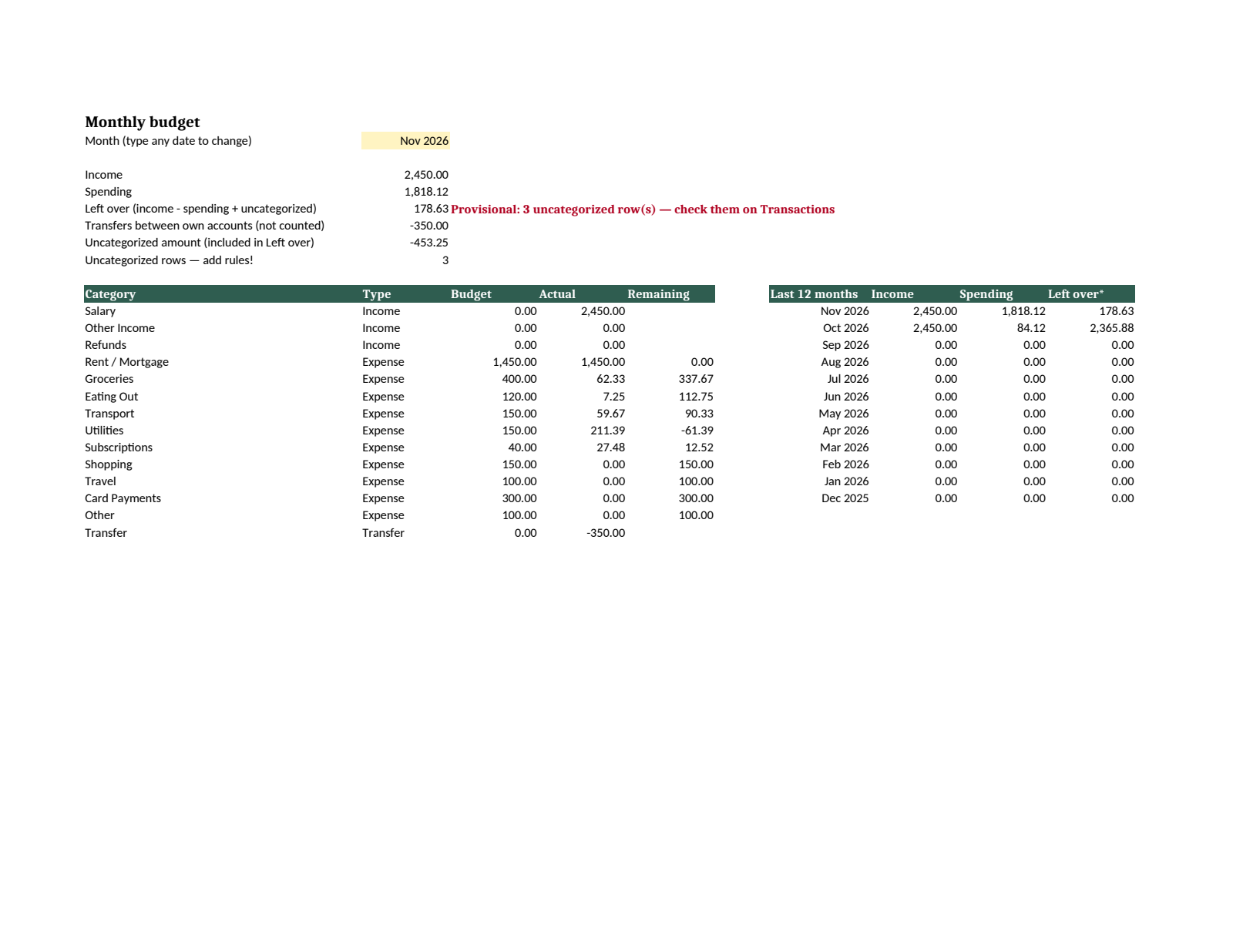
The Monthly tab of the included example file, filled with made-up transactions (rendered in LibreOffice).
How it works
- Paste your CSV into the Paste tab.
- On Settings, type which column is the date, description and amount.
- Keyword rules put each transaction in a category (first matching rule wins). Rows no rule matches are shown as Uncategorized and flagged, so you can fix them or add a rule for next time. Keywords can overlap, so glance over the result.
- The Monthly tab shows income, spending, what's left over, budget vs actual per category, and the last 12 months.
Before you buy — what it needs
- A CSV export with a date, a description and either one signed amount column or separate money-out / money-in columns.
- Numbers in US/UK style (1,234.56). Dates as M/D/Y, D/M/Y or Y-M-D (you choose which).
- An amount the sheet can't read (e.g. "N/A" or "12 USD") becomes 0, not an error. Amounts in other number styles can come out wrong without any warning: in our LibreOffice test, 1.234,56 became 1.23456. Compare the month's totals with your bank statement.
- Up to 1,000 transactions per paste, one account or card per paste.
- Tested by us in LibreOffice. Uses only functions Excel 2010+ and Google Sheets document as supported, but we have not yet tested it ourselves in Excel or Google Sheets.
Transfers and credit card bills
Transfers are kept out of income and spending. Rows categorized as Transfer — by a starter rule or by you — are not counted as income or spending, so moving money to savings doesn't show up as earnings. The starter transfer rules (TRANSFER, XFER, TO SAVINGS) sit at the end of the rule list and the first matching rule wins, so a row with one of those words becomes a Transfer only if no rule above matched it. Glance over your Transfer rows once and fix any row in the My category column.
Credit card bills are left to you. One sheet holds one account, so whether a card payment is spending or a transfer depends on your setup. There are no starter rules for card bills or card payments. A card payment that matches no rule shows as Uncategorized (still counted, month marked "Provisional"); one whose description contains another starter keyword gets that category instead — e.g. "AMEX PAYMENT TRANSFER" becomes a Transfer. Check every card payment row and pick in My category: Card Payments (spending) if the card's purchases aren't tracked anywhere else; Transfer on the card's own statement; or, if you keep one copy for checking and one for the card and add them up, Transfer on both sides.
Uncategorized money is not hidden. It is included in Left over and the month is marked "Provisional" until you categorize it.
What you get
- BankPaste-Budget.xlsx — the empty template (300 rule rows, 60 categories)
- BankPaste-Budget-DEMO.xlsx — a separate example copy with made-up transactions, so you can see it working before using your own data
- About 45 starter keyword rules for common merchants (edit or delete freely)
Privacy: the template has no macros, add-ons or scripts and sends nothing anywhere by itself. Where your data is stored depends on where you keep the file (your computer, Google Drive, etc.).
Refunds: if it doesn't work with your bank's CSV, reply to your Gumroad receipt email within 30 days and we'll refund you. You don't need to send us your CSV or any transaction data.
Get BankPaste Budget — $12 on Gumroad
Prefer to build it yourself? Free formulas
- Bank CSV spreadsheet formulas (this site) — the same free formulas on one page, with a sample CSV and example file to download.
- bank-csv-spreadsheet-formulas (GitHub, MIT) — formulas that turn bank CSV amount and date text into real numbers, sort rows by keyword and total without transfers, with an example file.
- Categorize bank CSV transactions in a spreadsheet with one formula (DEV)
- Turn messy bank CSV amounts and dates into real numbers (DEV)
These are written by the same seller as BankPaste Budget.